You don’t design APIs for yourself. I mean, you could, hypothetically, create an API that only you would use. I remember doing that a few times. A few times. Because often the APIs you design are to be used not by one but, if you’re successful, by droves of consumers. If that’s the case, then why do so many people insist on not following what consumers need? Is it because they don’t know how to do it? Or, is it because they don’t see any advantages in doing it? Stay with me and keep reading to explore.
What are the steps to create a successful API product? Learn about it by reading "Building an API Product."
The book targets Product Managers and non-technical people who want to know what it takes to build API products.
If this isn’t the book for you, perhaps someone you know would like to learn from it. Share it with your contacts and help us spread the word.
“Consumer-focused API Design.” That’s the name I like to give to the exercise of engaging with potential users to understand what they need. Without this engagement, I feel that what I’m building isn’t offering what consumers really need. Unfortunately, that is still the way many APIs are designed. And the result is what we all know. You try to use an API, but it doesn’t do what you expect. The API operations don’t seem to align with your use cases and your workflows. How can we fix this situation once and for all?
Fortunately, there’s a solution to fixing this lack of alignment. It’s often called product discovery, and it’s a technique used by product managers and designers. So, let’s not reinvent the wheel here and, instead, apply it to API Design. With product discovery, you can identify the problem you want to solve before even thinking about building a solution. Your focuses are consumer needs, the value the problem represents, and the viability of building a solution. You’re not thinking about the implementation, or even about exposing your internal systems as APIs. You’re simply understanding your potential API consumers and coming up with a definition of what they need.
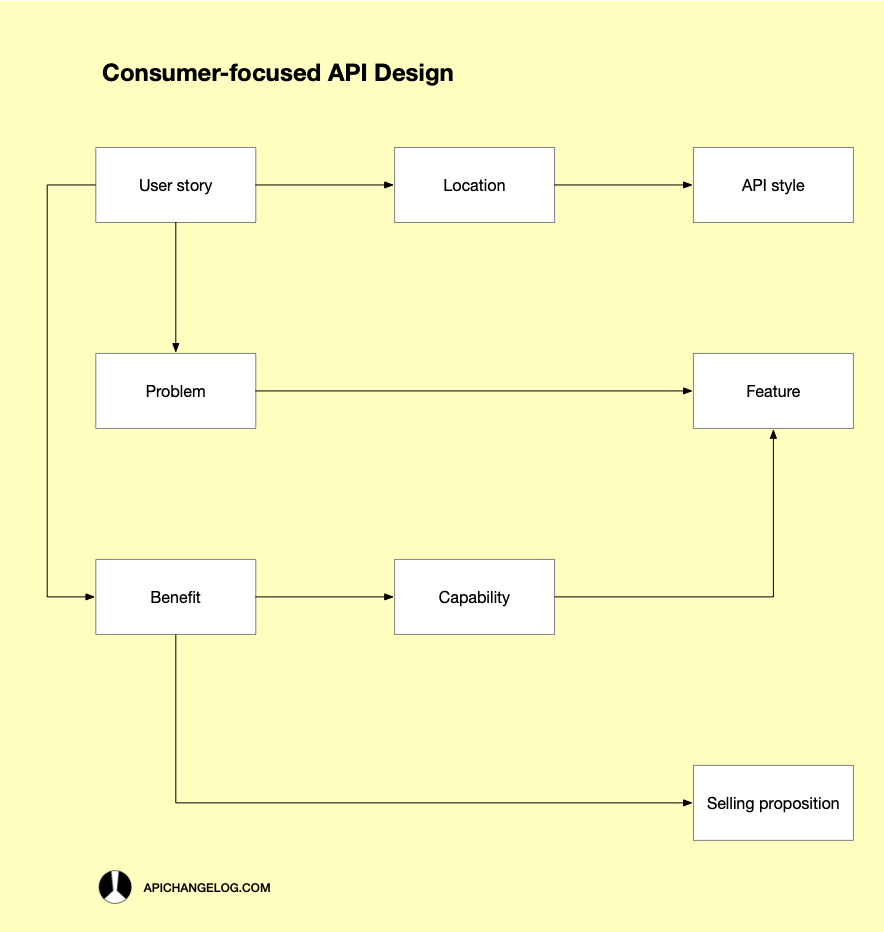
It all starts with a user story, right? User stories are pieces of information that represent what an API consumer would like to do to solve a particular challenge. When creating a user story, you follow a standardized format. Its most common elements are the user type, the goal, and the benefit. We’re also adding another attribute, the location, because it’s meaningful to the way we do API Design. We’ll dig into that soon, but first, here’s what an example user story for an API capability could look like:
As a developer, When I’m at the command prompt, I want to get a list of PRs I need to review, So that I can switch to each branch and perform a local code review.
Here, we’re identifying the user type as a developer, we’re saying they’re at the command prompt, and they want to get a list of pull requests from their favorite git service. The benefit of getting the list of PRs is to be able to switch to each branch and perform a local code review. There, you have everything you need to start designing your API. The attributes you should pay the most attention to are location, problem, and benefit, which I call the three user story ramifications.
The first ramification, location, has to do with what tools users will potentially use to consume your API from. In the previous example, a developer was at a command prompt. However, location can be almost anything you can imagine, e.g., some workflow system like n8n or Zapier, or even an LLM. What do we gain by knowing the location? Well, it can help us identify the API style. “If users have to change their routine just to use your API, they won’t find it easy and will probably give up after a few tries. By contrast, if they can use your API alongside the tools they’re already using, they’ll find it natural and simple, and they’ll keep using it over time,” I wrote in Building an API Product in 2024. It’s then crucial that users can consume the API you’re designing from their tools of choice. The second ramification has to do with what users are trying to achieve. The problem part of the user story is what describes the difficulty users have that makes them want to use the API you’re designing. A problem can directly translate into a feature that solves it. Finally, the third ramification describes what users get from using your API. A benefit translates directly into a selling proposition that you can use to promote the API and also into a capability.
But what exactly is a capability, and why is it so important in API Design? API capabilities can be features or can be more than that. What makes them important is that they’re idealized and defined from the perspective of the business. API capabilities aren’t purely technological. They mirror the needs of consumers and provide aligned outcomes. They follow what the business is looking for and offer ways to convert the provided benefits into clear marketable value. In summary, capabilities are what consumers look for when they’re looking for an API. So, designing your API focusing on the needs of consumers is one way to make sure you’re building the right capabilities.
As you’re seeing, there’s a lot to gain just by following the consumer-focused API Design approach. However, there’s also an effort you need to put into the process. If you don’t yet have a well-defined design process, making a change might not be that hard. On the other hand, if you have already invested in following a particular design workflow, then adapting might be costly. Remember, you need to adopt the product discovery mindset. Without it, your design won’t be as customer-focused as you’d wish. If you’re not product-oriented and prefer to follow your engineering instincts, then customer-focused API Design might not be for you at all.
Thanks for reading The API Changelog! Subscribe now for free.