
Exposing Workflows as API Operations
Any workflow can be available as an API operation.
A workflow that can't be executed remotely feels like a loss of potential. I mean, you can still trigger it manually, or even execute it periodically. However, there's no way for it to receive programmatic requests from the outside world. Why does that matter? If you want to trigger a workflow with a webhook, for instance, it needs to be executed remotely. Or, if you want to execute a workflow as a step of another workflow. Not having these possibilities is a limiting factor that you don't need. So, how do you make a workflow available as an API operation? Keep reading.
This article is brought to you with the help of our supporter, n8n.
n8n is the fastest way to plug AI into your own data. Build autonomous, multi-step agents, using any model, including self-hosted. Use over 400 integrations to build powerful AI-native workflows.
The most common way of triggering workflows is via polling. A workflow engine periodically polls a service or system and looks for changes in the responses. Whenever there’s a change that’s meaningful to the workflow, it gets triggered. At first, this might seem like a sensible approach. However, it either wastes resources or triggers the workflow with such a delay that makes its results outdated. That’s why people have been trying to find better options. One such alternative relies on webhooks to trigger a workflow whenever something changes. Now, instead of having to poll a remote operation, the workflow engine simply sits and waits for an incoming request. And that means that the workflow has to be available as an API operation. Or, the workflow engine has to translate an incoming request into a trigger to execute the corresponding workflow and pass it the right parameters. Either way, what’s important is that the workflow is programmatically reachable from the outside.
Fortunately, most workflow engines support webhooks. Some of them offer generic webhook support, while others offer integration with specific services. A good example is the popular chat service Slack. You can easily create a workflow that triggers whenever there’s a new message. Having support for webhooks is great. However, make sure your workflow system works well with generic webhooks, not just integrations with specific services, like Slack. Why is that important? Because it means that you can expose a workflow as you like. You can choose the design of the API operation that will trigger your workflow once it’s called. You can decide what are the input parameters that you’ll accept via the API operation, and which ones can be hardcoded as workflow variables. You can even try to adapt the shape of the request to what your consumers need, so it’s easy for them to use. In essence, the freedom to design your inbound API gives you the power to adapt it to the circumstances.

I've been experimenting with a solution that gives you the freedom to translate a workflow as an OpenAPI document. I'm talking about Arazzo, a specification that has the objective of providing "a mechanism that can define sequences of calls and their dependencies." Arazzo does that through a YAML or JSON document where you can, among other things, define how different API operations are called and how the outputs of one operation can feed the inputs of another one. I think this specification has a lot of room for exploration. So much so that I've been creating a workflow editor that can read and write Arazzo files.
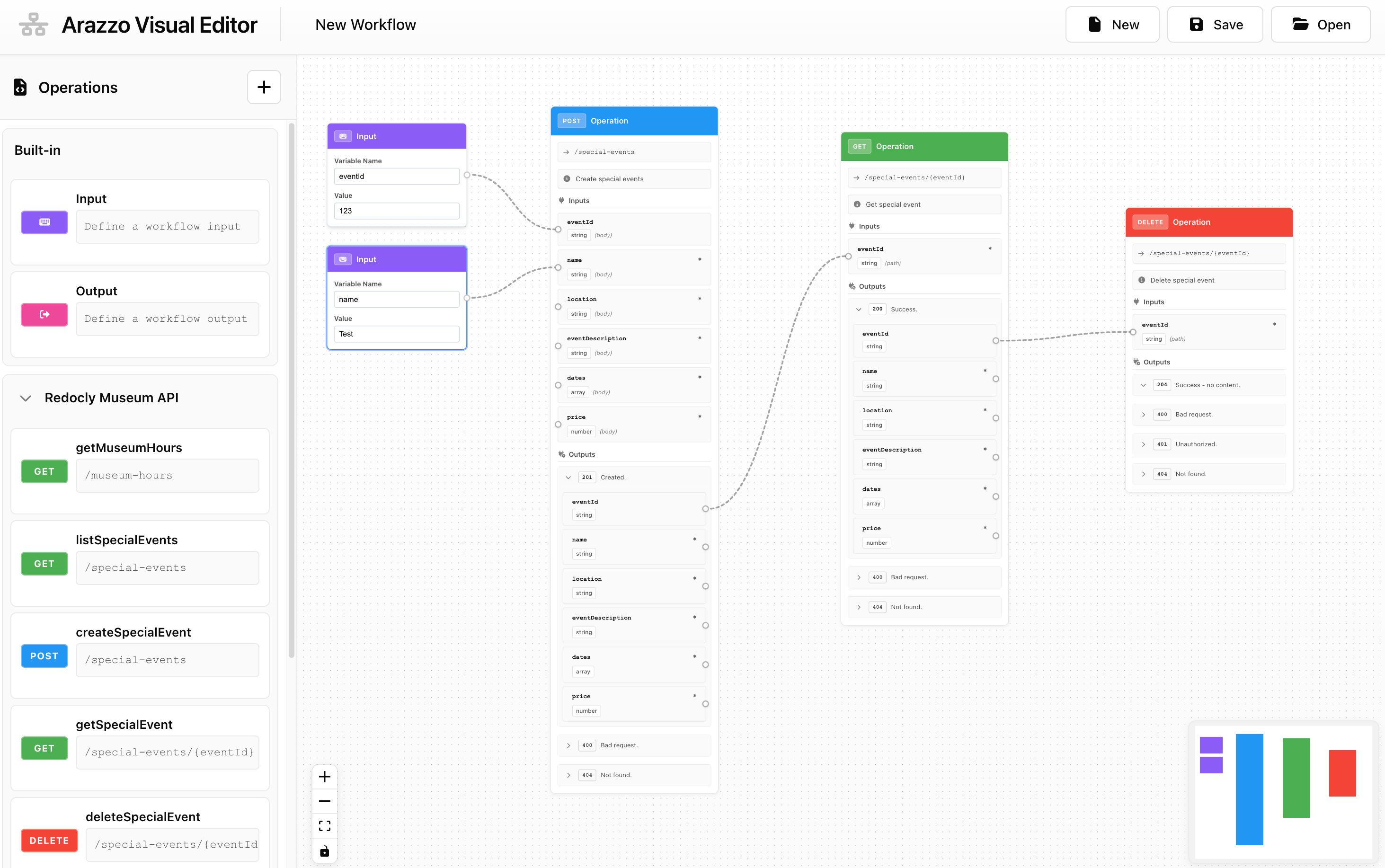
The visual editor hides the complexity of the Arazzo specification and makes it easy for anyone to design their workflows. Its output is an Arazzo document that you can use with any supporting tools. One such tool is the arazzo2openapi. It was published recently, and it lets you convert any Arazzo workflow to an OpenAPI document. I tried to convert the workflow illustrated by the screenshot above into an OpenAPI document, and it worked. Take a look at the API operation it generated.
paths:
  /workflows/new-workflow:
    post:
      operationId: execute_new-workflow
      x-arazzo-workflow-id: new-workflow
      summary: New Workflow
      requestBody:
        required: true
        content:
          application/json:
            schema:
              type: object
              properties:
                eventId:
                  type: string
                name:
                  type: string
The generator detected that I have two input variables and what their names are. From here, I could use this OpenAPI document to generate code that would trigger my workflow, for example. All this is quite new and isn’t polished or even easy to use if you don’t understand all the technologies. However, it feels like it’s a very good starting point to standardize API-based workflow triggering.
As you’ve just seen, exposing your workflow as an API operation comes with a cost. First, you have to understand how OpenAPI works. In many situations, you just want to use a visual workflow tool, and you really don’t want to have to mess around with code. Then, you have to maintain the setup so everything keeps working. Until there are tools that support the automated conversion of the OpenAPI into something you can visually connect to your workflow, you’ll have to dig into the code. This won’t be easy for non-technical people to follow along, I admit. If that’s your case, you can hire someone to do the work for you. However, you’ll have to pay for that as well.
Today, you have several options. You can go with one of the ready-to-use solutions in the market and configure webhooks. You can even use open-source solutions such as Apache Airflow and trigger your workflows by making a request to a specific API operation. Or, you can go all in and convert your workflows into OpenAPI operations that you can customize to the needs of your consumers. It all depends on your own business needs and how far you want to go.